
Buying art as an investment from overseas (UK buyers guide)
Learn about the risks and the long-term rewards of buying art as an investment and how to use Wise for high value purchases abroad.


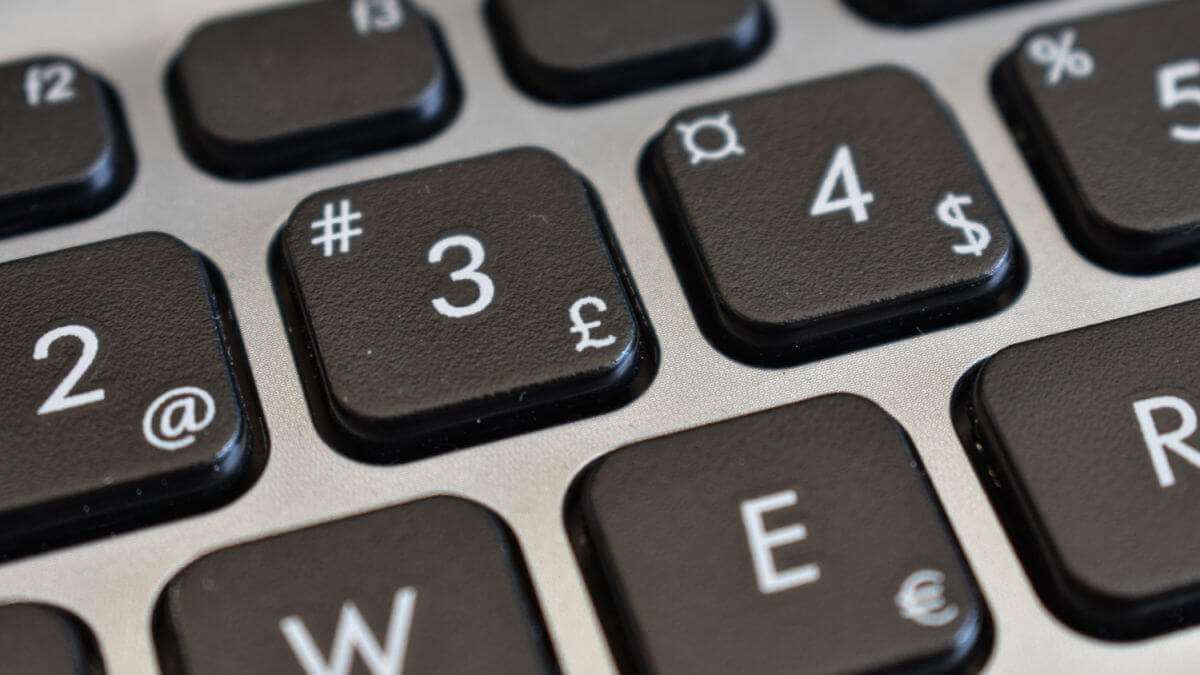
Need to add the British pound sign to your document, website, email, or when sending a DM? We got you covered. In this guide, we’ll go through everything you need to know about inserting the pound symbol on your keyboard and smartphone.
And if you need to send pounds overseas, the money services provider Wise has you covered along with over 12.8 million other people, offering low, transparent fees* and great exchange rates.
If you need to type the British pound sign, here’s how to do it on both a Mac and a Windows PC.
Firstly, on a Mac. The easiest way is to use the keyboard shortcut. This is to hold down Shift (Option on US keyboards), while pressing the number 3.
On a Windows PC or laptop, you can use exactly the same shortcut. Simply hold down Shift and then press the number 3. This is usually on the top row of your keyboard, although it can be to the side if you’re using a full keyboard with a number pad.
Many keyboards will also feature the £ symbol above the number 3, making it easier to remember which one to press. Although, of course, you’re not likely to find the British pound sign on American keyboards.
For ease, you can also go ahead and copy and paste the pound symbol from here:
£
To type the British pound symbol using the number pad on your keyboard, you can use an Alt code.
Here’s how to do it:
This method works on most Windows computers. If it doesn't work, check your keyboard settings or try a different method.
Using a smartphone, tablet or other mobile device? It couldn’t be easier to insert the British pound sign into a message or search query.
For both iOS and Android devices, you simply need to switch to the numbers and symbols keyboard. The £ sign should be one of the options. Although if it isn’t, you can also hold down the dollar sign ($) to see more currency symbol options.
If you don’t have access to a keyboard, there is a way you can insert a British pound sign on your word processor without typing.
On applications such as Microsoft Word or Google Docs, you can simply follow these steps:
The British pound sign looks like this:
£
According to the Bank of England, the symbol originates from the letter L. This is the first letter of the Latin word for ‘libra’, which means a pound of money.
The horizontal line was added later, although it’s not sure when. In the Bank of England’s collection, there’s a cheque dating back to 1660, where the line is present.¹
| 💡Read more: Different currency symbols of the world |
|---|
The British pound sign generally comes before the number. So when you’re writing a sum of money such as ten pounds, you’d write it like this: £10.
The British pound can be a little confusing to foreigners, as it has a few different names and abbreviations.
The currency is actually called sterling. Although internationally, it’s generally known as the British pound or pound sterling. Colloquially, British people sometimes call it a “quid”.
On the foreign exchange market, the British pound is abbreviated to GBP.
And that’s it - everything you need to know about how to type the British pound sign on Mac, PC or your smartphone.
Sources used:
Sources last checked on date: 22-Apr-2025
*Please see terms of use and product availability for your region or visit Wise fees and pricing for the most up to date pricing and fee information.
This publication is provided for general information purposes and does not constitute legal, tax or other professional advice from Wise Payments Limited or its subsidiaries and its affiliates, and it is not intended as a substitute for obtaining advice from a financial advisor or any other professional.
We make no representations, warranties or guarantees, whether expressed or implied, that the content in the publication is accurate, complete or up to date.

Learn about the risks and the long-term rewards of buying art as an investment and how to use Wise for high value purchases abroad.

Got a speeding ticket in the post after your trip abroad? Learn how to pay a Spanish speeding fine from the UK and why Wise is a great solution.

Need to change your payment method on DAZN or fix failed charges? Find out how and to explore how paying with Wise can help you reduce costs.

Need to to manage your Amazon Prime subscription? Learn how change the payment method and save on conversion fees by paying your bills with Wise

Need to change your Spotify payment method? Learn how to update payments, fix failed charges and save on currency conversion fees with Wise.

Read our helpful guide to SIPPs for non-UK residents, covering everything you need to know about Self-Invested Personal Pensions for UK expats.



















































