
How to Open a Business Bank Account in Finland: A Guide for U.S. Entrepreneurs
Learn how to open a business bank account in Finland with this guide. Get essential info and steps for setting up your business finances.



Venmo has become a popular way to send peer-to-peer (P2P) payments in its smartphone app. Around 76.4 million people in the US are forecast to use Venmo this year.¹
Independent contractors and freelancers might find it attractive to use the app for its convenience in taking payments, especially on the go. However, Venmo may not be the best option. Using Venmo can come with risks, including potential violations of Venmo's terms of service.
This article explores some of the situations in which you shouldn’t use Venmo for business transactions and suggests alternative payment methods.
It also looks at how a Wise Business account could benefit your business if you receive international payments regularly.

P2P apps like Venmo offer a fast and free way to send money to another user. The app stores the user’s credit card or bank account details, allowing them to send funds to or request payment from any other user of the app. This has gained popularity as a way for people to split bills with friends or send money to family members.
Some small business owners and freelancers started to use Venmo to accept payments from customers without having to use a traditional merchant account and to avoid payment processing fees.
The app does now offer a Venmo for Business profile to separate business transactions from personal payments. However, this is aimed at small sellers and gig workers rather than established businesses that require comprehensive financial protections.
| You can also read the full Venmo for Business review to learn more about this account |
|---|
Despite Venmo offering a business profile, there are some points to consider before using Venmo to accept business payments.
Using a personal Venmo account to handle business transactions violates Venmo's User Agreement. The agreement states: “You can receive payments for the sale of goods and services only by using a business profile or by asking the sender to identify a payment as for goods and services.”²
If Venmo detects unauthorized business activity in your personal account, it could limit your access to your business funds, hold or reverse transactions, or even freeze or close your account. This can cause serious disruptions to your business operations and cash flow.
| Find out the key differences between Venmo Business vs Personal accounts |
|---|
As a primarily P2P app, Venmo offers Purchase Protection but does not provide comprehensive buyer and seller protection for business transactions. This means that if a customer disputes a payment or requests a chargeback, you may lose the funds. This can be costly for your business if you use Venmo for high-value transactions.
Venmo works for simple payments within the US such as bills or to transfer money between friends. Unfortunately, Venmo cannot be used for international transfers or if you are located outside the US.
Although it is free to receive payments in a personal Venmo account, there is a 1.9% + $0.10 transaction fee for business payments. This only applies to payments to a business profile from customers using the Venmo app or a QR code. The fee to receive credit card payments is 3.49% + $0.49 and there’s a 2.29% + $0.09 fee if customers use Tap to Pay.³
Once you receive payments into your Venmo account, you have to transfer the funds to your business bank account manually. Regular transfers, which take 1-3 business days are free, but instant transfers cost 1.75% of the amount transferred. This fee is a minimum of $0.25 and is capped at $25.
There’s also a limit of $5,000 per transfer every three days if you’ve verified your identity, otherwise transfers are capped at $999.99.
As it wasn’t designed for business use, Venmo doesn’t provide tools or integrations to help manage your business. There are no tools to automatically calculate sales tax, track your taxes due or create monthly reports. Without integrations with accounting software and other apps, using Venmo can complicate bookkeeping and financial management – creating more manual work.
If you need a secure and reliable way to accept payments for your business, consider using payment platforms that are specifically designed for business transactions. Popular options for Venmo alternatives include:
Find out more about Wise Business

When choosing a payment platform for your business, look for the following features:
If you’re looking for a low-cost, easy way to receive and manage payments from customers, consider Wise Business.
Venmo for Business is suited to small US-based businesses and gig workers, but it does not support international payments.
For businesses that operate internationally or frequently deal with multiple currencies, Wise Business offers a convenient alternative to Venmo for Business.
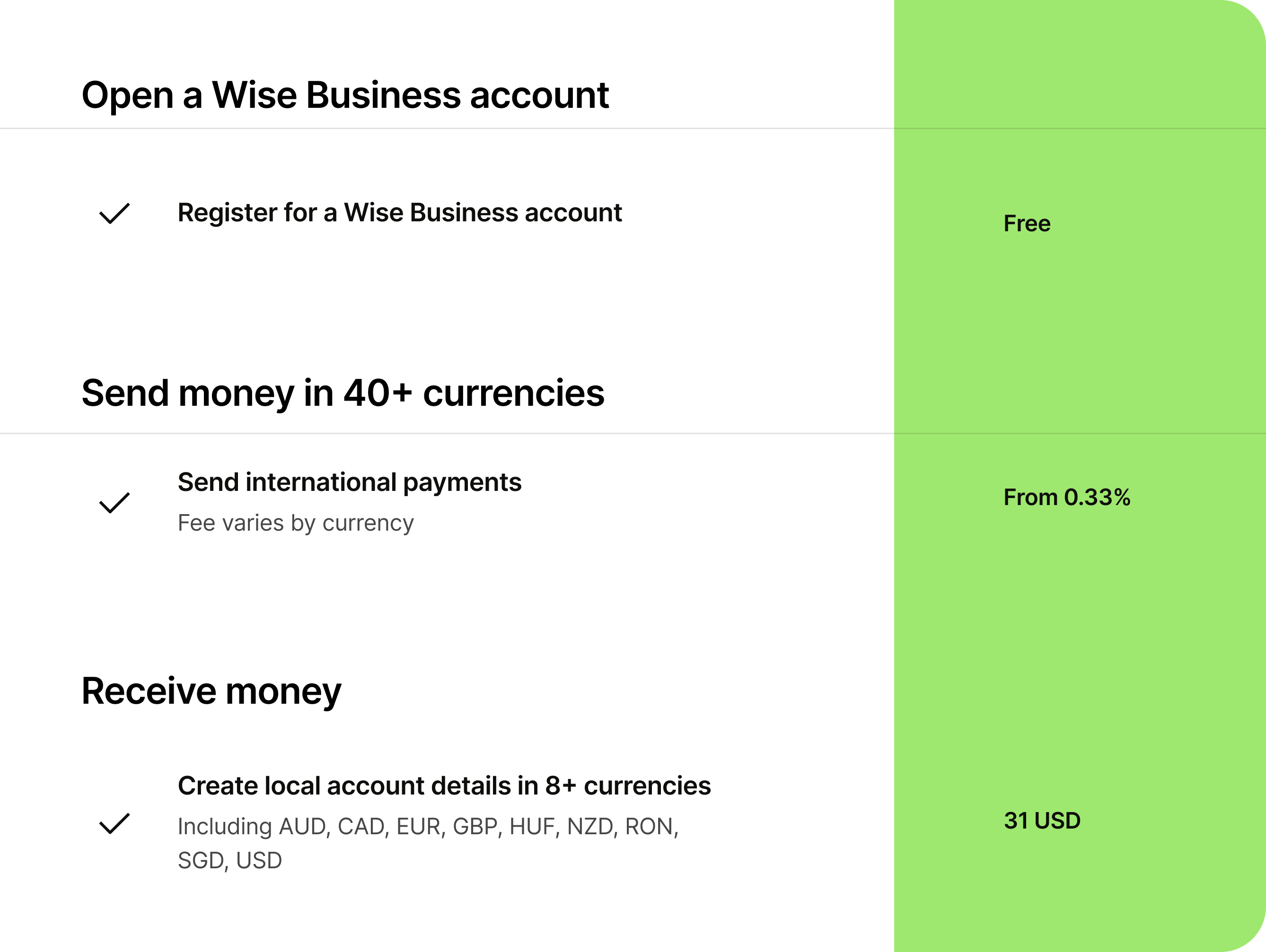
Wise is not a bank, but a Money Services Business (MSB) provider and a smart alternative to banks. The Wise Business account is designed with international business in mind, and makes it easy to send, hold, and manage business funds in 40+ currencies. You can get major currency account details for a one-off fee to receive overseas payments like a local. You can also send money to 140+ countries.
Open a Wise Business account online
| Some key features of Wise Business include: |
|---|
|
| Read the guide on how to open a Wise Business account |
|---|
| Editor & Business Expert: | |
|---|---|
 | Panna is an expert in US business finance, covering topics from invoicing to international expansion. She creates guides and reviews to help businesses save time and make informed decisions. You can read more useful business articles on her author profile. |
| Author: | |
|---|---|
 | Nicole is a professional journalist with two decades of experience in writing and editing, she has also run her own freelance business for the past five years. Her expertise spans the financial and technology industries, including payment processing and small business banking. |
Sources:
¹ JetBlue adds Pay with Venmo
² Venmo User Agreement
³ About Venmo Fees
All sources checked March 2025.
*Please see terms of use and product availability for your region or visit Wise fees and pricing for the most up to date pricing and fee information.
This publication is provided for general information purposes and does not constitute legal, tax or other professional advice from Wise Payments Limited or its subsidiaries and its affiliates, and it is not intended as a substitute for obtaining advice from a financial advisor or any other professional.
We make no representations, warranties or guarantees, whether expressed or implied, that the content in the publication is accurate, complete or up to date.

Learn how to open a business bank account in Finland with this guide. Get essential info and steps for setting up your business finances.

Learn how to open a business bank account in Switzerland. Discover the essential steps to set up your business finances.

Learn how to open a business bank account in France. Get essential tips and steps for setting up your business finances.

Learn how to open a business bank account in Germany. This guide offers localized steps for setting up your business finances efficiently.

Discover the best client onboarding software to streamline your process, enhance client experience, and boost efficiency. Find your ideal solution today!

Find the best returns management software to streamline your business operations. Discover top solutions for efficient product returns.




















































