
Understanding EFT Payments: A Guide for NZ Businesses
We’re covering everything the Kiwi business owner needs to know about EFT payments, from definitions to benefits, types, and challenges.


Mastering the art of invoicing can reduce back-end admin, hasten payments, and project a professional image for your business. Whether you’re a sole trader or an SMB, it’s worth learning how to send an invoice, track payments, and follow up professionally.
In this post, we’re covering everything you need to know about invoicing, from crucial inclusions to templates, accounting software, best practices, and challenges. We’ll also show you how to save on FOREX fees when invoicing clients based overseas.
| Table of Contents |
|---|


An invoice details the products or services rendered and provides a cost breakdown and payment terms. For the seller, a professional invoice helps track sales and ensure prompt, accurate payments. Customers find invoices useful for recording purchases, monitoring inventory, and managing cash flow.
Clear, unambiguous invoices also help resolve payment disputes by providing a legal record of the mutually agreed-upon transaction.
The required info can vary by industry and service. Nonetheless, most invoices include the following elements:

There are several ways to create an invoice, each with varying levels of complexity and cost.
One free option is to enter data into a text document or spreadsheet and manually update the date and number for each invoice. But unless you’re a talented graphic designer, the result may look a tad unprofessional.
Alternatively, companies like Wise offer free invoice templates and tools. Enter the details in the relevant fields, then hit “create” to generate a polished-looking invoice containing your logo, line items, GST calculations, and more. Wise also provides free downloadable Word and Excel invoice templates.
Many established businesses use accounting software with invoicing tools, such as Xero or MYOB. These can automate manual, time-consuming tasks, including emailing invoices, monitoring bank accounts, and sending late payment reminders. Some can also generate financial reports or a “Pay Now” button that links to a payment gateway.
The best accounting programs include eInvoicing, which automatically exchanges invoices between buyers and suppliers, even when they use different accounting software. This capability slashes admin costs for business-to-business (B2B) brands with high order volumes.
Regardless of which invoicing method you use, following best practices will improve efficiency and professionalism.
The ideal time to issue an invoice varies by industry and service type.
Regardless of the chosen method, sending a whole bunch of invoices at once may create cash flow volatility. Many businesses spread invoices throughout the month to create smoother, more predictable payment cycles.
In New Zealand, you must send taxable supply information (invoices) to GST-registered buyers within 28 days of a request, or by an alternative agreed date.3

There are several different approaches businesses can use when sending invoices.
The classic approach is to create a PDF invoice and attach it to an email. Businesses can do this manually or use accounting software to automate the process. Emails include a timestamped record for future reference if required.
Some small businesses and sole traders create invoices in a mobile app and send them to customers via SMS or messaging apps like WhatsApp, either as an image or a payment link. This approach can save time, especially for on-the-go workers, but it may be perceived as less professional in some sectors.
B2B and business-to-government (B2G) companies commonly use eInvoicing, a time-saving capability that leverages secure eProcurement frameworks like Peppol. Through a compatible accounting program, eInvoicing can automatically generate, send, and track invoices on a shared network – no need to send or monitor emails.
Most New Zealand businesses avoid printing physical invoices due to high costs and slow postal timeframes. But some exceptions exist in more formal, or high-value sectors, such as construction, logistics, aerospace, and governance.
Creating and sending an invoice is relatively straightforward. Issues arise when chasing up payments, especially for businesses billing large numbers of customers per month.
Acounting softwares are a great way to slash admin effort by monitoring your bank account for payments and sending friendly automated reminders. Many businesses also report faster payments and improved client relationships when using automated invoicing software – no more awkward phone calls.
When dealing with international clients, foreign exchange fees can create complications and bite into your bottom line. Most payment methods, such as standard SWIFT bank transfers and credit cards, entail lousy exchange rates and eye-watering FOREX fees.
Managing the administrative side of a growing business often feels like a balancing act between staying professional and reducing manual data entry.
Wise Business helps solve these common logistical hurdles by offering an integrated invoicing tool that allows you to create, send, and track invoices in multiple currencies.
For New Zealand businesses working with international clients, this means you can bypass the high conversion fees and poor exchange rates typically associated with cross border business transactions. By providing local account details in over 8+ currencies, you can receiving payments like a local.
Expanding a business globally opens up exciting opportunities, but also new challenges like receiving payments across borders. Hidden foreign transaction fees and hefty currency conversions involved with international payments can eat into your profits and time.
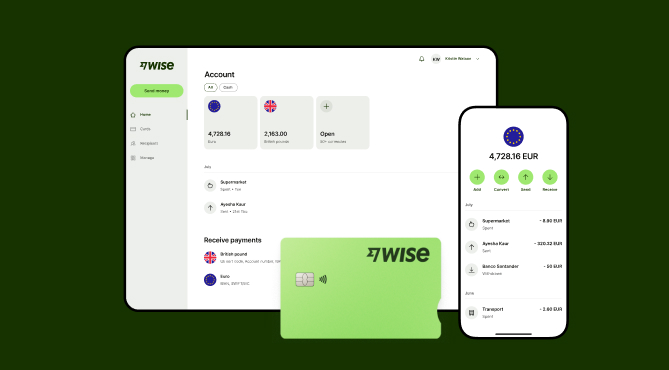
Wise Business serves as a cost-effective solution where you can receive money from around the world at the speed and price of local payments.
Transform the way you receive payments with Wise Business:
Sign up for the Wise Business account! 🚀
This general advice does not take into account your objectives, financial circumstances or needs and you should consider if it is appropriate for you.
What is the best way to send an invoice by email?
Accounting and invoicing software can automatically send invoices on your behalf, reducing administrative burden.
How do I invoice someone for the first time?
When invoicing a client for the first time, it’s best practice to make a quick follow-up call to confirm they received the document and understand the terms.
How should I follow up on overdue payments?
Accounting or invoicing software is the best way to stay on top of overdue payments. Otherwise, you can track payment manually on a spreadsheet.
Sources:
*Please see terms of use and product availability for your region or visit Wise fees and pricing for the most up to date pricing and fee information.
This publication is provided for general information purposes and does not constitute legal, tax or other professional advice from Wise Payments Limited or its subsidiaries and its affiliates, and it is not intended as a substitute for obtaining advice from a financial advisor or any other professional.
We make no representations, warranties or guarantees, whether expressed or implied, that the content in the publication is accurate, complete or up to date.

We’re covering everything the Kiwi business owner needs to know about EFT payments, from definitions to benefits, types, and challenges.

Learn how direct debit works for New Zealand businesses, its benefits, how to set it up, and how Wise Business simplifies international recurring payments.

Discover what a point of sale (POS) system is, how it works, its types, and how to choose and set up the right POS software and hardware for your NZ business.

Discover what remittance advice means for Kiwi SMBs. Learn its benefits, types, how to use a template, and tips for managing international supplier payments.

Guide to nz telegraphic transfers. learn about swift codes, bank fees, and how to send money overseas. Compare costs and explore alternatives.

Learn how recurring payments work for Kiwi SMBs. Learn about fixed vs variable types, direct debit, setup steps, and recurring payments with Wise Business.

















































