
How to use GCash in mainland China? Is GCash available in China?
Learn how to use GCash in mainland China - Alipay+ QR payment steps, GCash Card acceptance and ATM withdrawal limits, plus fee considerations.


Alipay is one of the most commonly used payment apps in China. Many foreigners living in China find it quite essential to their daily life in China. But if you are new to Alipay, you often have questions such as how to register, how to top-up Alipay, when will your money arrive, and can I top up my Alipay account using international bank cards (the answer to that last point is no, by the way). In this article we will answer your questions following the most up-to-date Alipay balance top-up policies and what bank cards it supports at present.
As an expat living in China, do you also have problems finding a useful platform to send your Chinese RMB earnings back home or outside China? Wise, founded in 2011 now has 16 million happy global users and could help you out on this! The Wise English App enables foreigners in China to easily navigate and convert CNY to other currencies, and Wise handles international money transfers using only a mid-market exchange rate.
Yes. Though it is a dominant payment platform in China and first launched in China in 2003, Alipay is now available in many countries worldwide such as Australia, the United States, Canada, the United Kingdom, Hong Kong, Japan, the Philippines, Singapore, South Korea, Vietnam, Bangladesh, France, Iceland, Italy, Norway, Russia.¹
Foreigners in China can create an Alipay account using a phone number or an email address.
In future identity verification steps, you can use your passport or ID document to get approved.
Here is the China mainland version Alipay registration guide: ⁵⁺⁶
At this stage, you just have an account, but you can’t use any payment function or receive money until you connect a bank card or add a payment method to your account.
For expats in China, you might wonder if you should use your Chinese phone number or your native country's phone number. To enjoy Alipay’s products and features, linking your Chinese phone number is better. First of all, it’s easier for your Alipay account to get verified, and linking a mainland Chinese bank-issued debit card to top up your account will also streamline your Alipay service in the future.
For more information about registering for Alipay account please click here.
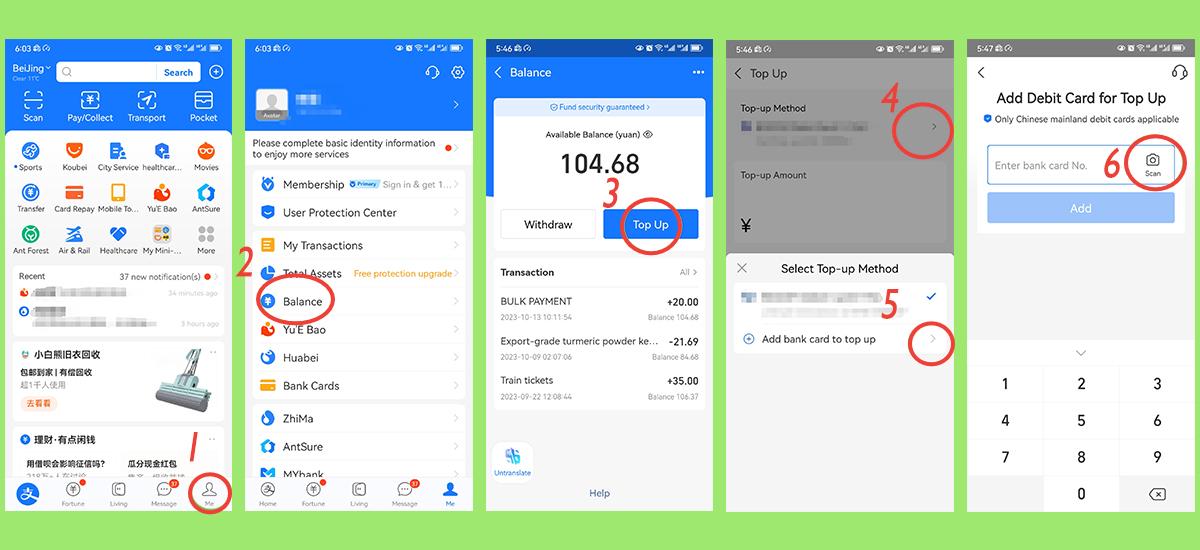
For expats topping up your Chinese Alipay account balance is quite simple, here is an easy 6 step guide with screenshot illustrations to show you how to do it.
No. According to the Alipay personal account help center,³ it doesn’t support top up using any type of credit cards in general.⁴This includes international credit cards. Because the credit card top-up business itself carries a certain amount of cash-out risk, and anti-money laundering and secure cash withdrawal has always been the common mission and responsibility of all commercial banks and also with Alipay itself, according to Alipay.
No. At the moment users can only use mainland Chinese debit cards to top up their Alipay account.
As shown in the screenshots (taken by our freelancer who also is an expat working in China). When you top up your Alipay, it will automatically notify you what kind of banks and cards they support.
Please note: If you check the full list of banks that Alipay supports as a payment method when topping up your balance, you can see below these foreign banks are available. But if you try them out, you will get the same alert again saying “Only Chinese mainland debit cards are applicable”.
These banks are in the “add bank card” list but are not applicable for topping up Alipay and your Alipay Balance.
It’s important to know that adding a bank card to Alipay is one thing and topping up your account balance is another. Currently, when adding or linking bank cards to Alipay, it supports linking international credit cards issued outside of the Chinese mainland, such as Visa, Master, Diners, and Discover, and these cards are limited to only certain Alipay services. But to top-up your account balance, the only bank cards Alipay supports currently are mainland Chinese debit cards.
It is also advised that foreigners in China constantly update their Alipay app to the newest version to avoid bugs, and update to the newest foreigner friendly features and policies.
No. Once your Alipay account has been verified with your identity, it will only allow you to link any card that belongs to the same person. And an identity-verified Alipay account won’t be able to change to someone else’s identity. When you register for Alipay in the first place, make sure whose account you want it to be, you or your families’.
Max 30 cards.
It instantly arrives and shows on your Alipay balance once you refresh the page as long as your bank card has sufficient money and hasn’t reached its daily transfer limits.
Go to the Alipay app home page and click “Me”, then select “Balance”, you’ll see the figure there.
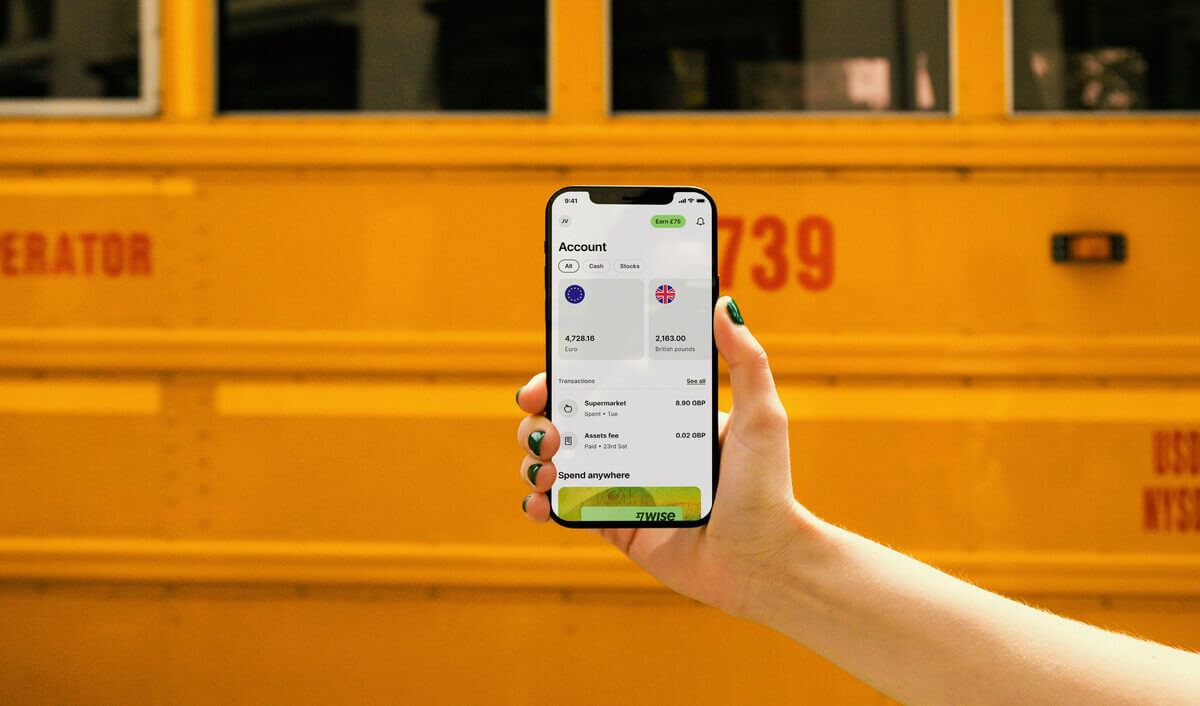
Founded in 2011, Wise is a trustworthy international money transfer provider. It can send money to 70+ countries at a fair mid-market rate, cheaper than many providers. This way we save your money when sending money home. And using our app you can do it easily by yourself at home, no need to get a ticket and wait in the Chinese bank lobby. Not to mention our high level of English international service compared to local banks.
We’ve introduced an easier way for you to pay for your transfers — Alipay.
Whether you’re paying expenses in another country or sending money to family back home, you can use Alipay to pay for transfers of up to 50,000 CNY.
Unlike bank transfers, there are no minimum limits on what you can send and Alipay operates all day, every day. So you can send money at a time that suits you, not them.
How to pay with Alipay
There’s more than just money transfer: There are other benefits of having a Wise account!
Open Wise account, you can have account details like Pounds, Euros, Canadian dollars, Australian dollars etc. This allows you to receive those local currencies thus avoiding the cost of converting money.
This service is provided in partnership with a licensed third party payment provider in China.
Sources:
*Please see terms of use and product availability for your region or visit Wise fees and pricing for the most up to date pricing and fee information.
This publication is provided for general information purposes and does not constitute legal, tax or other professional advice from Wise Payments Limited or its subsidiaries and its affiliates, and it is not intended as a substitute for obtaining advice from a financial advisor or any other professional.
We make no representations, warranties or guarantees, whether expressed or implied, that the content in the publication is accurate, complete or up to date.

Learn how to use GCash in mainland China - Alipay+ QR payment steps, GCash Card acceptance and ATM withdrawal limits, plus fee considerations.

You can use Mastercard or Visa as forms of payment in China, but there are some limitations and pitfalls you should know about.

Planning to use your AlipayHK in mainland China? You're not alone in wondering how seamless it truly is. This article is your quick guide to everything you...

WeChat Pay HK works in China, but it has some limitations and fees.

Does Venmo work in China? Can you use Venmo in China? This article will answer every question you might come up with about using Venmo in China.

Does Monzo work in China? This article will answer every question you might come up with about using Monzo in China.

















































