
PayPal Invoice Fee
PayPal invoicing service is free - but there are PayPal invoice fees to watch out for. Collecting invoice payments to your PayPal account incurs a charge.


QR codes have become an increasingly popular payment option, and many small businesses use a QR code to accept payments.
The QR code payment market will grow substantially in the coming years. According to Research and Markets, the global QR industry will grow at a CAGR of 17.2% through 2030.¹ Moreover, 30% of global smartphone users used a QR code payment option in 2025.²
Using a QR code for payment can be a convenient option for both companies and consumers.
This article will discuss the benefits of using a QR code to accept payments and discuss factors that companies and consumers should consider.
A payment QR code is a type of barcode that helps companies rapidly receive payment information from a customer. Companies used these tools to help facilitate payments via a mobile phone or other devices. Many consumers prefer using a QR code for payment because of the speed and convenience.
There are two types of QR codes for payment, including static codes and dynamic codes. The main difference between these two codes is that static codes can’t be altered once the code is generated, while dynamic codes can be altered.
| With Wise, you can easily receive international payments using the QR codes feature. Simply share your QR code with customers, and get paid in seconds. |
|---|

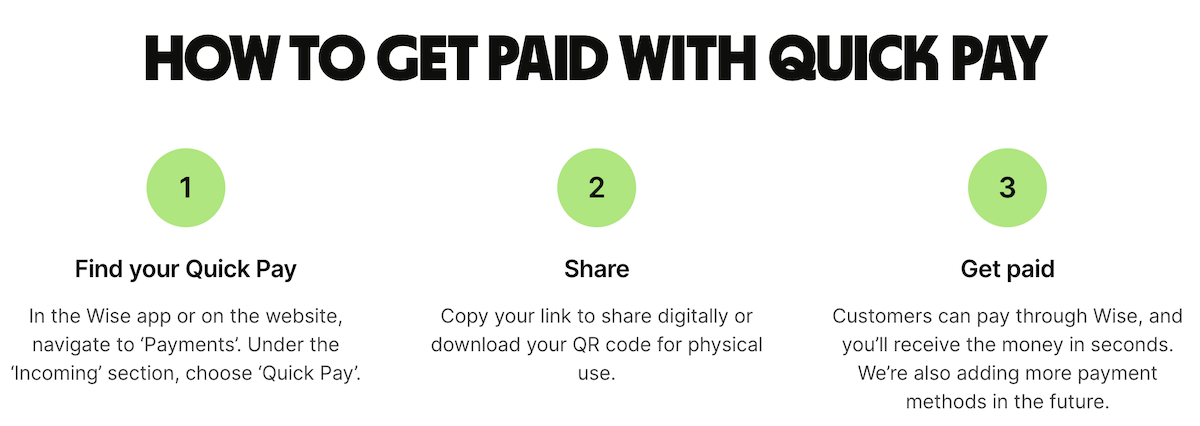
It is easy for companies to create a QR code for payment if their provider offers this feature. For example, Wise Business customers can get a payment QR code when they set up QR codes.
QR codes is available to all Wise Business accounts that have:
Once your Wise account is set up, you can get your QR codes link or QR code by:
You can now share your link or QR code with anyone. When they click the link or scan the QR code, customers will be directed to log into Wise and pay you — even if they don't have your account details.
Customers who want to use a payment QR code need to scan the code provided by the business. They have the option of either using a smartphone camera to scan the code, or within other payment apps.
Once the QR code is generated, the customer will need to:
Popular QR code payment apps, such as PayPal, Venmo, or Square, can make the process easier for customers. You can also use Wise to make payments using a QR code. Wise customers can benefit from convenient, cost-effective payment methods in multiple currencies. In particular, Wise can help customers enjoy the mid-market exchange rate when they make QR transactions in foreign currencies.
| Read on for more: |
|---|
The goal of a QR code payment is to provide a quick and secure way for customers to make payments with their mobile devices. While this process is generally very straightforward and stress-free, customers can occasionally run into issues.
There are many reasons why a QR code payment system may not work correctly. The QR codes may be incomprehensible due to the low quality of the image or color/contrast issues. Businesses should also make sure there is not a problem with the initial link customers click, as well as the rest of the payment process.
Other issues that customers need to account for include security concerns, hidden fees, and scams. The best practice to avoid this is to avoid QR codes in suspicious locations (i.e., spam emails and outdoor locations) and ensure that the QR code is actually from the intended company.
It's important to ensure the payment QR code is safe before you open it. To avoid any types of scams or security issues, be sure that the QR code is legitimate. If you receive an email or see a QR code in a random location outside, it is best to ensure that this QR code is actually from the company and not a scam. Many scammers will even place fake QR codes on restaurant menus or send emails with fake QR codes.
If you use an app to make a QR code payment, make sure the app offering is secure. You can also use your phone’s camera app to avoid downloading third-party QR code apps.
Some of the main QR code payment methods include merchant POS codes, peer-to-peer transfer QR codes, and other QR codes used for online purchases.
Merchant POS codes: These codes enable contactless payments by allowing customers to scan a QR code with their mobile device.
Peer-to-peer transfer QR codes: This allows companies to display a QR code on popular apps like Venmo or PayPal. The customer can open the QR code through these apps and then make a payment.
Online purchases: Businesses can also link QR codes to their online checkout process, allowing customers to pay by entering their banking info or by using a third-party app.
The QR code is merely the interface, and the actual money transfer takes place through your bank. Any potential issues with your card or bank could cause payment issues, even if the QR code is functioning correctly. If the QR code does not initially work, you may need to check your camera app or internet quality to ensure this isn’t causing the issue.
Businesses typically pay transaction fees when they offer card payment options for their customers. Offering a QR code payment is a great option, as many customers prefer the convenience.
Some companies, like Stripe and Venmo, offer contactless payments with a QR code. The fees are generally similar to card transactions, and there is an extra flat fee for the contactless option on top of the percentage charge.⁸,⁹
Another important consideration to address is international payment fees. When you use QR codes and make payments in foreign currencies, your bank or payment app may have an unfavorable exchange rate. Wise is an excellent tool for international QR code payments, as customers of Wise can take advantage of the mid-market rate and avoid hidden fees.
| Are you looking for a hassle-free business account with free tools? Consider a Wise Business account for low-cost, multi-currency transactions, a free invoicing tool and business templates. |
|---|
| Find out more about Wise Business |
Is it safe to pay with a QR code?
Yes, it is safe to use QR codes as long as the code comes from a trusted source. For example, many restaurants offer QR code menus with payment options. Companies may also send these QR codes by email or have them on their website. To avoid scams, be sure to ensure that the QR code comes from a trusted source. Scanning a QR code in a random public space or from a spam email can lead to scams.
Can I use any QR code scanner for payments?
In order to use a QR code scanner for payments, you will need to have some type of app installed on your phone. You can use popular apps like Venmo or Stripe to make payments with your QR code. There are also other QR code apps that you can download. If your smartphone has a built-in camera app, you can use this to access a URL and make a payment if the company offers this option online. Whatever option you choose, you need to ensure that it is compatible with the QR code payment system.
What's the difference between QR code payments and contactless card payments (NFC)?
While both payment options are contactless, there are several differences between QR code payments and contactless card payments. QR codes use a camera scan, either through a customer’s camera app or other banking or payment apps. NFCs use close-range radio communication to process payments.
Small businesses should strongly consider offering QR code payment options for their customers for many reasons. In many cases, QR code payment options may be cheaper for your business and more convenient for customers. Moreover, this payment option is often faster, which can improve your turnover time and free up time for your employees.
As mobile payments continue to grow in popularity, offering a QR code payment option can improve the customer user experience and also help your business cut costs. Businesses should take steps to ensure that their offerings are secure and compatible for customers. While customers should be wary of security issues, QR code payments are a helpful payment method that can make things easier for consumers.
Offering your customers quick and convenient payment options is a must in 2026. Popular options such as mobile payments and QR codes have become more popular in recent years. Moreover, many businesses are also beginning to increasingly send and receive international payments.
Wise is a powerful solution that can help companies offer their customers the best payment options available. Customers can make quick and convenient payments and your business can avoid costly currency conversion fees on international payments.
Receive payments with Wise Business
Wise is not a bank, but a Money Services Business (MSB) provider and a smart alternative to banks. The Wise Business account is designed with international business in mind, and makes it easy to send, hold, and manage business funds in multiple currencies. You can get major currency account details for a one-off fee to receive overseas payments like a local. You can also send money to 140+ countries.
Sources:
*Please see terms of use and product availability for your region or visit Wise fees and pricing for the most up to date pricing and fee information.
This publication is provided for general information purposes and does not constitute legal, tax or other professional advice from Wise Payments Limited or its subsidiaries and its affiliates, and it is not intended as a substitute for obtaining advice from a financial advisor or any other professional.
We make no representations, warranties or guarantees, whether expressed or implied, that the content in the publication is accurate, complete or up to date.
PayPal invoicing service is free - but there are PayPal invoice fees to watch out for. Collecting invoice payments to your PayPal account incurs a charge.

Learn how to use Wise Business for direct deposit with this step-by-step guide. Receive local payments easily and save on currency conversion fees.

Top international payment methods: 1. Payment Gateways 2. International Transfer Providers 3.P2P payments 4.Swift Payments 5. Debit Cards...

Learn how to start a business in Texas with our comprehensive step-by-step guide.

If you’re deciding between Wise vs Revolut for business, then this article will help compare the two. Fees ✔️Features ✔️Pros ✔️Cons ✔️

Discover the most profitable items to import from China in 2026. Maximize your margins with our top product picks.


















































