
Singapore Visa for Indians in Australia: Requirements, Fees, & Application Guide
Living in Australia on an Indian passport and planning a trip to Singapore? Discover how to secure your Singapore visa directly from Australia.



Don’t want to rely on cash in Singapore? Get QR payments sorted before you go. Use Wise to scan eligible SGQR codes and pay at food stalls, markets and smaller shops that don’t take cards.

 *For product availability and more information, visit wi.se/pay-qr.
📱 Unlock QR payments with Wise
Increasingly, payments by QR are the norm, allowing frictionless transactions which avoid the need to carry cash. If you’re planning a trip to Singapore, you may like to learn about how to make a Singapore QR code payment for foreigners.
This guide covers how to pay with QR code in Singapore step by step. Plus, we’ll also introduce Wise for paying in Singapore with QR code or card, with the mid-market rate and low conversion fees every time.
If you’re visiting or relocating to Singapore, paying by QR code is a convenient option for day-to-day expenses. A common question is whether every QR code in Singapore is the same. In practice, no—but Singapore solved this issue early on by introducing SGQR (Singapore Quick Response Code) 1.
SGQR is a unified, single label that consolidates multiple domestic and international electronic payment options into one code sticker displayed at the storefront1. Instead of a messy counter full of different QR codes, you just see one central SGQR label featuring different payment scheme logos underneath it1.
The two main underlying networks you will encounter in Singapore are:
Just scan the QR with a compatible app to pay using your preferred method. Generally, to use local bank apps, you will need a Singapore bank account—but foreign tourists can scan these codes through international services, including global networks or using their Wise app.
QR payments are more and more commonly used in Singapore. In cities and transit areas across the island, you’ll find SGQR codes on display in many stores, restaurants, cafes, and stalls3.
Uptake is especially high in Singapore's iconic hawker centers and traditional food courts, where a simple infrastructure setup allows small stalls to displace cash for low-value payments. While almost all small stalls now accept QR codes, it’s still a smart idea to have some cash on you if you encounter occasional stalls with network issues. Take along your Wise card for some free ATM withdrawals each month whenever you need cash on hand.
If you live in Singapore as an expat or long-term resident, setting up local payment apps is straightforward. Once you have a local Singapore bank account (with major institutions like DBS/POSB, OCBC, or UOB), you can use their official mobile banking apps to scan PayNow or NETS QR codes across the broad domestic ecosystem2, 3.
Beyond traditional bank apps, residents frequently use local e-wallets. The most common options include DBS PayLah! (a standalone digital wallet by DBS), GrabPay (integrated into the Grab super-app), and ShopeePay6. These e-wallets link seamlessly with local accounts and cards, allowing you to pay by scanning any matching logo featured on a merchant’s SGQR sticker.
For short-term visitors in Singapore, navigating local systems depends entirely on what apps you already use. Downloading a local Singapore banking app is generally out of reach since it requires a local tax or residency ID to open an account.
However, international tourists can increasingly use their home country's apps to scan select SGQR and NETS QR codes at checkout, thanks to expanding regional cross-border payment partnerships. For instance, tourists visiting from China can often scan using Alipay, WeChat Pay, or the UnionPay app3.
Travellers from neighboring Southeast Asian nations can also leverage reciprocal central bank agreements—such as Malaysia’s DuitNow QR (via apps like Touch 'n Go eWallet, Maybank2u, or Public Bank), Thailand’s PromptPay (via K PLUS or TrueMoney), and Indonesia’s QRIS—to pay directly through participating home bank apps3, 4.
For a solution that bypasses regional boundaries, using Wise for QR payments can be an ideal solution. While you could try downloading separate regional wallets, using the Wise app means you don’t need to sign up for multiple local apps for your travels around Asia, and it gets you the mid-market exchange rate too.
The features available to you inside the Wise app depend on where your account was registered:
You can choose to convert your balance to Singapore Dollars (SGD) before you travel to lock in a rate, or simply let Wise’s auto-conversion tool handle the exchange instantly when you pay.
If you are wondering how to pay with QR code in Singapore, the basic process is usually simple:
The key question is not how scanning works. It is whether your app supports the specific code in front of you. If you already have a Wise account, there’s no need to download a specific QR payment app for your trip to Singapore. Just use the Wise QR reader to pay.
You can use Wise to pay without cash across Singapore where you see a PayNow QR or an eligible NETS QR displayed. This is available in stores and restaurants.
The process to pay with a QR in Singapore is simple and saves you from carrying around a lot of cash in SGD. To give an example, here’s how to pay a merchant in Singapore:
- Open the Wise app and tap Scan on your Home tab, or go to the Cards tab and swipe to the front of the card queue until you see the image of your card.
- Tap the QR code symbol to launch the QR scanner.
- Aim the QR scanner at a supported PayNow or NETS QR code. Alternatively, tap Photo to upload a QR code from your image gallery, > or Document to upload a file stored on your device.
- Enter the payment amount if applicable, review any fees and confirm your payment in the Wise app.
If the QR code is saved on your phone, you can still use it to make a payment through Wise. After opening the QR scanner in the Wise app, import Photo to select an image from your gallery. Wise will then read the code and guide you through the payment confirmation process.
The exact QR payment fees and charges you pay depend on the specific service you choose, as well as the funding method.
If you’re a foreign resident of Singapore and use a local QR payment app linked with a domestic SGD bank account, you will find there’s no fee for everyday merchant payments.
Tourists using traditional foreign bank cards via digital payment tools often face foreign transaction fees added by their home bank. Again, this depends on the provider you use—but in many cases, traditional card issuers will add a fee of around 3% to payments processed in a currency different from the underlying account.
As we’ve seen, paying by QR with Wise is simple, and it also allows you to skip hidden foreign transaction fee markups. You can spend from an SGD balance with no additional Wise fee, or leave your balance in whichever currency you happen to have, and let the app convert to SGD at the point of payment. In this case, you get the mid-market rate and low, transparent conversion fees.
Here are a few other financial apps and wallets which are popular for QR payments in Singapore. Some services may require a local bank account or local residency data, so you’ll need to compare your options before you sign up:
Whether you’re grabbing chicken rice at Maxwell Food Centre, shopping along Orchard Road, or taking a weekend trip around Marina Bay, Wise gives you flexible ways to pay while you travel. With Wise, you can:
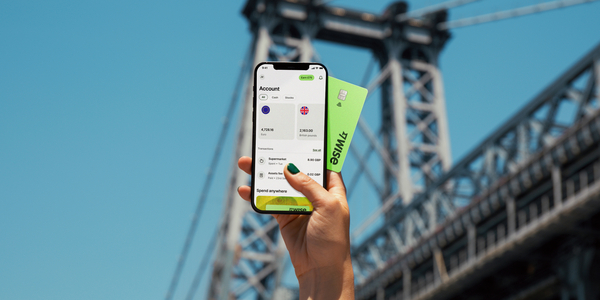
- Scan and pay via QR: Use the Wise app to scan PayNow QR codes at thousands of merchants across Singapore. Or easily scan Alipay+ QR codes to pay like a local across other Asian destinations.
- Tap and pay: Add your Wise card to Apple Pay or Google Pay for contactless payments.
- Make chip and PIN payments: Use your physical card to make payments.
- Withdraw cash when needed: Get free international ATM withdrawals up to $400 AUD (or equivalent) per month for those cash-only shops.
- Generate instant digital cards: Create virtual cards in seconds for safer online bookings or to use immediately with mobile wallets.
- Purchase discounted airport lounge access: Relax before your flight with access to 1,400+ lounges globally, bookable directly in the Wise app for up to 30% less than walk-in rates.
Whether you’re tapping your card in a boutique or scanning a QR code at a local hawker, Wise ensures your money goes further on every Singapore adventure.
*Please see terms of use and product availability for your region or visit Wise fees and pricing for the most up to date pricing and fee information.
This publication is provided for general information purposes and does not constitute legal, tax or other professional advice from Wise Payments Limited or its subsidiaries and its affiliates, and it is not intended as a substitute for obtaining advice from a financial advisor or any other professional.
We make no representations, warranties or guarantees, whether expressed or implied, that the content in the publication is accurate, complete or up to date.

Living in Australia on an Indian passport and planning a trip to Singapore? Discover how to secure your Singapore visa directly from Australia.

Find the best Singapore travel eSIM for your trip from Australia. Compare coverage, data costs, and top providers to stay connected for less.

Layover in Singapore? Find out if you can leave the airport, check eligibility for free city tours, and see the ultimate itinerary for your stopover.

Planning a trip to Singapore? Discover if tap water is safe to drink for travellers. This is your guide on Singapore's water quality.

Planning your Singapore trip? This guide covers the entry requirements and visa options available for Australians.

Singapore is a tiny country located at the tip of the Malay Peninsula in SouthEast Asia. The country itself only spans 50 km wide, but boasts approximately...


















































