
Best eSIM for Philippines: Data Plans & Costs Compared for Aussies (2026)
Find the best Philippines travel eSIM for your trip from Australia. Compare coverage, data costs, and top providers side-by-side to stay connected for less.



Increasingly, payments by QR are the norm across Asia, allowing frictionless transactions that eliminate the need to carry cash. If you’re planning a trip to the Philippines, you'll find that mobile wallets have largely transformed the local retail landscape—meaning you'll definitely want to learn how to make a Philippines QR code payment as a foreigner.
This guide covers how to pay with a QR code in the Philippines step-by-step. Plus, we’ll also introduce Wise for paying in Philippines with QR code or card, with the mid-market rate and low conversion fees every time.
| Table of Contents |
|---|
If you’re visiting or relocating to the Philippines, paying by QR code is an incredibly convenient option for day-to-day expenses. However, a common question among travelers is whether every QR code in the country works the same way.
The digital payment ecosystem in the Philippines relies heavily on two elements:
Before the introduction of GCash's GTourist account², setting up GCash was often frustrating for foreigners because the standard service was designed around Filipinos or those with Philippine mobile numbers, while foreign residents also had to complete additional identity verification using documents such as an Alien Certificate of Registration (ACR). While GCash GTourist made digital payments more accessible for short-term visitors, the registration process and eligibility requirements can still be cumbersome for some travelers. Fortunately, you no longer have to navigate these local roadblocks to go cashless.
QR payments are widely embraced across the Philippines, particularly in urban areas and tourist hotspots. You’ll find QR Ph and GCash QR codes prominently on display at¹:
While QR adoption is incredibly high, cash is still king when traveling off the beaten path or visiting rural beach destinations (like remote parts of Palawan or Siargao). Keep a Wise card handy to grab cash from local ATMs with free monthly allowances whenever you hit a cash-only spot.
How you navigate mobile payments depends on how long you intend to stay in the country.
If you're living in the Philippines long-term, you can use local e-wallets like GCash and Maya, but each has different verification requirements for foreign users. GCash³ generally requires a valid Alien Certificate of Registration (ACR) card as part of its identity verification process for foreign residents. Maya⁴, meanwhile, accepts a foreign passport for account verification, although some features have additional eligibility restrictions. For example, Maya states that it is currently unable to open Maya Savings accounts for U.S. persons⁵.
If you're only visiting the Philippines for a short trip, setting up a local payment app can still be challenging. While GCash now offers a GTourist² account for visitors, it has several eligibility requirements. You need a non-Philippine mobile number, must verify your identity with a foreign passport and selfie, and your account only activates once you're in the Philippines. GTourist accounts are also valid for just 30 days and, at present, are available only to users with U.S. (+1) phone numbers. Other local apps may also require a Philippine mobile number or additional identity verification before you can use their full features.
Using Wise helps you avoid these sign-up steps. Instead of downloading new local apps every time you travel, Wise lets you pay like a local across Asia and globally. In the Philippines, you can just open your Wise app and natively scan the merchant's QR Ph or GCash QR code to pay directly.
Paying at the counter with Wise is incredibly simple and takes only a few seconds:
- Look for the payment code display at the merchant counter and check for the QR Ph logo or GCash / Alipay+ signage.
- Log into your Wise app and go to the Card tab.
- Tap Pay with QR Code
- Frame the merchant's physical QR code with your phone camera. (Alternatively, tap "Photo" to import a QR code image saved to your gallery).
- For Alipay+, you can also show your Wise app QR code to the merchant you’re paying.
- Review the payment amount in Philippine Pesos (PHP) and confirm the transaction.
- The payment processes instantly, and you will see it reflected in your transaction history.
The exact fees you encounter depend on the currency you hold and the provider you choose.
Tourists who try to link traditional foreign credit or debit cards to local scanning tools often get hit with unexpected foreign transaction fees of around 3% from their home bank.
With Wise, you can pay in Philippines at mid-market rate with low fees:
Whether you’re grabbing fresh street food in Manila, booking an island hopping tour in Palawan, or cafe-hopping in Boracay, Wise gives you flexible ways to pay wherever you go. With Wise, you can:
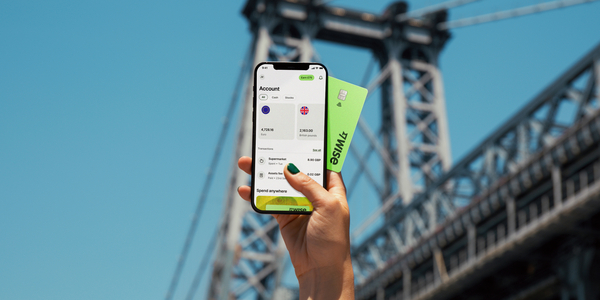
- Scan and pay via QR: Use the Wise app to scan QRPh or GCash/Alipay+ codes at thousands of markets, taxis, and merchants across the Philippines, as well as other supported QR codes across other Asian destinations.
- Tap and pay: Add your Wise card to Apple Pay or Google Pay for contactless payments.
- Make chip and PIN payments: Use your physical card to make payments.
- Withdraw cash when needed: Get free international ATM withdrawals up to $400 AUD (or equivalent) per month for those cash-only shops.
- Generate instant digital cards: Create virtual cards in seconds for safer online bookings or to use immediately with mobile wallets.
- Purchase discounted airport lounge access: Relax before your flight with access to 1,400+ lounges globally, bookable directly in the Wise app for up to 30% less than walk-in rates.
Whether you’re tapping your card in a boutique or scanning a QR code at a local street stall, Wise ensures your money goes further on every Philippine adventure.
*Please see terms of use and product availability for your region or visit Wise fees and pricing for the most up to date pricing and fee information.
This publication is provided for general information purposes and does not constitute legal, tax or other professional advice from Wise Payments Limited or its subsidiaries and its affiliates, and it is not intended as a substitute for obtaining advice from a financial advisor or any other professional.
We make no representations, warranties or guarantees, whether expressed or implied, that the content in the publication is accurate, complete or up to date.

Find the best Philippines travel eSIM for your trip from Australia. Compare coverage, data costs, and top providers side-by-side to stay connected for less.

Wondering when the best time to visit the Philippines from Australia is? Learn more about weather, seasons and what to do in the Philippines.

Travelling from Australia to the Philippines? Let’s fill you in on the travel requirements, touristy and non-touristy spots and other need to knows in our guide

The Philippines is made up of some 7,000 islands and draws visitors with its idyllic beaches, vibrant cities, and friendly people. There are large expat...

If you’re off to the Philippines, it’s probably not at the top of your to-do list to check in with your doctor and get vaccinated. If you’re American,...

Contributing over 10% of the nation’s GDP - tourism in the Philippines is a big deal. You can see why. The country is spread across over 7000 islands with...



















































