
Revolut business review: Plans, fees, and Australian alternatives
Read here for a review on Revolut Business in Australia. Compare multi-currency features, subscription plans, out-of-hours transfer fees, and alternatives.



For Australian businesses making payments locally and overseas, getting the right setup makes it easier to sort finances and reduce the cost of managing different currencies. Two compelling options for this in 2026 are OFX and Airwallex.
In this blog, we’ll review OFX vs Airwallex, first detailing what they specialise in and their core features, then comparing them across service categories and headline fees, to give you a better idea of what might work best. There’s also an intro to Wise Business: a multi-currency account for cross-border business transactions.
| Table of Contents |
|---|


OFX is a global money transfer platform that helps businesses pay, hold, receive, and convert multiple currencies from a single account, with competitive FX and fast, secure transfers. It’s designed to simplify cross-border payments and company-wide spend – last year, its customers moved $38.4 billion globally through the platform¹.
To this end, OFX has three broad service categories: Accounts, Payments & Cards, Manage & Control spending, and Platform Capabilities (for integrations and customised workflows)¹. Within each of these are the essential features for managing your business finances in Australia and overseas, many designed around foreign exchange.
With OFX, you can¹:
Airwallex is a financial platform that lets global businesses build a complete infrastructure for day-to-day payments and money management. It’s built for scale, powering $287 billion in global payments each year and used by 200,000+ businesses, with tools to lift growing startups, as well as larger enterprises².
Airwallex groups its services into five categories: tools for managing your business spending and taking payments (checkout, invoicing, subscriptions, usage-based billing), plus APIs to build your own financial products². It’s also planning to launch in-person payments in Australia.
With Airwallex, you can²:
While Airwallex is positioned more as a fintech platform and OFX as a global money and FX specialist, there is quite a bit of overlap in features, especially with their respective multi-currency accounts. Below is a table comparing the core features/services.
| Feature | OFX¹ | Airwallex² |
|---|---|---|
| Multi-currency accounts | ✅ Manage 30+ currencies | ✅ Global Accounts in 20+ currencies |
| Local account details | ✅ Open receiving accounts in 5 currencies | ✅ Open receiving accounts in 20+ currencies, including NZD³ |
| International transfers | ✅ Send funds to 180+ countries | ✅ Send funds to 200+ countries |
| Corporate cards | ✅ Visa debit cards | ✅ Visa debit cards |
| Online payment acceptance | ❌ Not offered | ✅Use Checkout and Payment Links to take 160+ local payment methods |
| Accounting integrations | ✅ Xero and QuickBooks | ✅ 8 apps including QuickBooks, Xero, and Sage⁴ |
Now, we’ll look at Airwallex vs OFX in more detail, starting with the process for opening a business account in Australia.
OFX says getting set up “is easy”, though you will have to wait for their ‘specialist team’ to contact you to verify your details after completing the initial onboarding form, where you must share some personal/business details and documents¹. After the support team has given you the green light, you can add funds and start transacting straight away.
There’s a more formal process with Airwallex across three steps: a. verifying the business, b. verifying connected individuals (like directors), and c. completing other requirements, such as providing additional ID documents⁵. You’ll need an active Australian Business Number (ABN) and must submit bank statements, audits, and tax returns as evidence of the “nature” of your business activities.
OFX lets you manage 30+ currencies through its Global Business multi-currency account, so you can handle all your finances domestically in AUD while also paying bills and sending money internationally from one hub⁶. You can pay, hold, and receive funds ‘like a local’ in USD, EUR, CAD, GBP, and AUD, while making cross-border payments to 180+ countries in 30+ currencies¹.
Airwallex also has multi-currency Global Accounts, with a wider selection of local receiving accounts – you can get bank details for 20+ currencies, including NZD, HKD, SGD, and USD to hold and convert at a time that’s best for your business³. When sending money, you can complete transfers from Australia to 200+ countries in 60+ currencies⁷.

OFX has a ‘Spend Management’ service category with quite a few tools to simplify employee expense admin. You can quickly set custom budgets and approval workflows, and also capture receipts within the mobile app to automatically extract expense data, so there’s less manual reporting⁸. Spending can also be coded to your general ledger and synced with Xero or QuickBooks.
Airwallex also has Expense Management software that automates expense reviews, approvals, and reimbursements across multiple business entities (for larger corps). You get AI-powered receipt matching and categorisation, too, and automated syncing with Xero, QuickBooks, NetSuite, and other tools to reconcile all your expenses without fuss⁹.

OFX has Visa debit cards built for global spending – you can use Apple Pay and Google Pay to make “zero-fee” transactions in over 30+ currencies, then track everything from a simple dashboard on the mobile app¹. It’s also easy to quickly issue virtual Company and Employee cards for your teams to use, complete with useful controls such as freezing and individual limits¹⁸.
Airwallex has a very similar offering, with company and employee Visa debit cards that tie neatly into its Expense Management service, which lets you keep tabs on every expense from one platform. Custom controls are plentiful – you can set custom expiry dates and per-transaction limits, all built for global spending with ‘market-leading FX,’ so there are fewer surprise fees¹⁰.
Airwallex has a large catalogue of integrations across four categories: Accounting Services, Productivity, Marketing & Sales, and Ecommerce⁴. There are currently 8 accounting software integrations, including Xero, QuickBooks, and Sage, plus 12 ecommerce apps to streamline orders and payments on platforms such as Amazon, eBay, and Shopify⁴.
OFX says it’s “working on more” integrations, but for now, you’ll only be able to plug into Xero and QuickBooks, although that’s likely to be enough for small businesses to reduce time-consuming manual entry and automate key bookkeeping tasks¹.
OFX and Airwallex both use a subscription model, with free plans available alongside paid tiers that offer additional features and higher usage limits. Their other fees vary depending on how you use the platform, so it’s worth looking beyond the monthly cost to get a better idea of the overall price.
Here’s an overview of how Airwallex vs OFX compare on pricing.
| Fee | OFX¹¹ | Airwallex¹² |
|---|---|---|
| Monthly account fee | $0 on Standard, $75 inc GST per month for Full Suite (5 users) | $0 or $29 per month for Explore (subject to conditions), $99 per month for Grow |
| Domestic cards | 1.27% Visa/Mastercard | 1.65% + $0.30 AUD |
| International cards | 3.40% Visa/Mastercard | 3.40% + $0.30 AUD |
| Currency conversion fee | 1.50% FX margin on international card payments | 0.5% above interbank rate for major currencies, +1% for other currencies |
| International transfer fee | $10 per cross-border Wire/SWIFT transfer | $10–$30 per SWIFT transfer |
The card fees here aren’t directly like-for-like: OFX’s rates apply when paying by card or receiving funds into its Global Business Account, while Airwallex’s rates are for accepting card payments from customers.
Here’s how the two platforms compare on Trustpilot.
| Airwallex | 2.9 rating from 2.5k+ reviews¹⁴ |
| OFX | 4.2 rating from 11.4k+ reviews¹³ |

When comparing different providers, it’s useful to take stock of your specific business requirements. You should think about:
Wise Business is another option for Australian businesses that need to manage international money. It uses the mid-market exchange rate (no markups), with international transfer fees varying by currency and starting from just 0.63%. You also get account details in 22+ currencies. All of this with no recurring monthly fees.
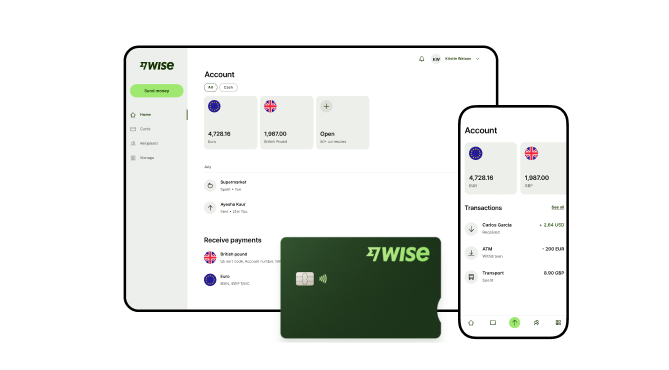
A Wise Business account allows users to send, receive, and hold in multiple currencies. Experience hassle-free global transactions by transacting like a local business. Here's what you get with a Wise Business account:
Sign up for the Wise Business account! 🚀
This general advice does not take into account your objectives, financial circumstances or needs and you should consider if it is appropriate for you.
**Capital at risk, growth not guaranteed. Interest is the name of a custody and nominee service provided by Wise Australia Investments Pty Ltd in partnership with Franklin Templeton.
1. Can I integrate OFX and Airwallex with my Xero accounting software?
Yes, both OFX and Airwallex integrate with Xero. You’ll be able to sync all your payments and expenses in real time, so your records update automatically without manual work, which makes reconciliation much easier.
2. What are the transfer limits with OFX and Airwallex
OFX says it doesn’t enforce maximum transfer limits¹⁵, giving you freedom to send as much as you want above the $250 AUD minimum¹⁶. Airwallex states that transfer limits depend on several factors, including the transfer method, and that the exact details are provided when creating a transfer¹⁷.
Source:
*Please see terms of use and product availability for your region or visit Wise fees and pricing for the most up to date pricing and fee information.
This publication is provided for general information purposes and does not constitute legal, tax or other professional advice from Wise Payments Limited or its subsidiaries and its affiliates, and it is not intended as a substitute for obtaining advice from a financial advisor or any other professional.
We make no representations, warranties or guarantees, whether expressed or implied, that the content in the publication is accurate, complete or up to date.

Read here for a review on Revolut Business in Australia. Compare multi-currency features, subscription plans, out-of-hours transfer fees, and alternatives.

Compare PayPal and Airwallex features, setups, coverage, and fees for Australian businesses managing global money, plus alternative accounts like Wise Business.

Compare multi-currency business accounts in Australia. Learn how they work, the fees to expect, and the best options.

Compare Revolut vs Airwallex for Australian businesses. Explore features, fees, and exchange rates, plus see how both platforms stack up against Wise Business.

Compare Payoneer alternatives in Australia. Discover the best platforms for international payments, compare fees and features, and how Wise Business fares.
Comparing OFX vs Wise Business in Australia? Explore features, fees, exchange rates, and reviews to see which is best for your business needs in 2026.

















































