
Best Payment Gateways for eCommerce
Need a fast, frictionless, and cost-effective payment solution for your online store? We cover the best payment gateways for ecommerce.



Online payments made up 20% of all consumer retail payments in Australia in 2025¹. For small businesses not taking payments online, that means a big chunk of potential revenue is often left on the table. Fortunately, it’s relatively simple to get an online payment system set up to reach more buyers and increase sales.
This blog will outline exactly how to set up online payments for a small business, breaking down the different systems and methods available, what you need to do to get started, and some of the challenges you might run into and how to address them.
| Table of Contents |
|---|


There’s a growing appetite for e-commerce: 68% of Australians now make at least one online payment a week, through mobile apps and website checkouts¹. Implementing a system to take these payments will put your business on the front foot, ready to meet changing preferences and capture more revenue.
It also allows businesses to:
Online payments are well-suited to most startups and micro businesses that need faster, simpler ways to accept customer payments:
Now, let’s look at how the main payment systems and methods work. The government states that ‘no one type of payment is best’ and that which you choose should be dependent on your business requirements.2
| Method | What it does | Ideal use case |
|---|---|---|
| Cards and digital wallets | Lets customers pay with cards or saved wallet details | Ecommerce, service businesses, mobile-first audiences |
| Payment links and invoices | Sends customers to a hosted page to complete a transaction | Services, B2B billing, anyone without a website |
| Bank transfers and PAYID | Supports direct account-to-account payments | Trades, professional services, high-value payments |
| Direct debit and PayTo | Pulls funds automatically with customer authorisations | Subscriptions, memberships, recurring billing |
| BNPL | Lets customers split purchases into installments | Retail, electronics, large consumer purchases |
| Multi-currency accounts | Lets customers receive payments in multiple currencies | Small businesses with cross-border transactions |
A card checkout lets customers pay by debit or credit card, which collectively make up 11% of all online payments in Australia¹. You can accept cards by setting up a payment gateway or online payment platform and adding its checkout to your website. Digital wallets (such as Apple Pay) can usually be enabled through the same provider, with customers using saved card details to pay.
Cost - Usually a transaction fee for each payment, made up of a percentage plus a small, fixed fee, e.g. 3% + $0.30 AUD. Some providers may also charge monthly or setup fees.
Payment links, where you send customers to a hosted page to complete a transaction, are a very quick method for taking online payments. These can be created through an online payment provider like PayPal or Wise and then shared via email or social media, or added to online invoices, so customers can pay directly from them.
Links and invoices are a useful alternative to a full ecommerce checkout for businesses that sell services or bill customers.
Cost - Transaction fees when a customer pays, plus subscription (and other potential fees) for invoicing and payment software.

Customers can pay directly from their bank account using a standard bank transfer or PayID – an Australian payment service that links a bank account to an ‘identifier’ such as a mobile number or ABN. Around 50% of Australians used PayID in the last year, according to RBA data, so it’s an option most local businesses should consider¹.
To accept these, you just need to give customers your bank account details (or registered identifier), either on an invoice or via a payment request.
Cost - Local bank transfers and PayID in AU are usually free or very low-cost to receive³. International bank transfers (via SWIFT) often involve higher bank fees and FX costs.
Standard direct debit is still the most popular way to ‘pull’ funds directly from a customer’s account, but PayTo – a service created by Australian Payments Plus – gives people more visibility and control over authorisations⁴. To use direct debit, you need a provider that supports it, plus a customer mandate to draw from their account. PayTo works similarly, but customers approve and manage the agreement in their banking app.
Cost - Fees vary by provider and may include setup, monthly or transaction charges.
Buy now, pay later (BNPL) services like Zip and AfterPay let customers split a purchase into instalments, with the business typically receiving the full account upfront minus fees. To offer this, you generally need to sign up with a BNPL provider and integrate it with your website or payment platform. The option then appears at checkout.
Cost - Fees can range from 2–8% of the transaction, depending on the service².
A multi-currency account lets a business receive and hold money in several currencies without forced automatic conversions. If you have customers overseas, they can pay in their local currency and you receive the funds directly.
Some providers, like Wise Business, offer local account details in multiple countries, meaning international customers can pay you as if they were sending money domestically. Conversions are also done with transparent fees, at the mid-market exchange rate with no hidden markups. This allows small businesses to avoid losing much on cross-border transations.
Cost - Typical costs involved are the conversion fees which vary by provider. While some providers convert at the mid-market rate, it is common to come across transfer services where a small markup is placed on the exchange rate. It is best to lookout for these when identifying a solution.


When you start thinking about setting up a system, try not to overcomplicate things. You’re basically setting up a way for customers to pay you choosing how they’ll do it and connecting everything to a provider that sends the money to your bank account.
Selecting a payment method your customers naturally prefer – and one that fits how your business sells – makes it more likely they’ll complete the transaction. For example:
Next, pick a platform with the tools you’ll need to take online payments. This might include:
Some providers combine several of these services in one platform to make things easier.
Create the accounts with your chosen payment provider (and any other platforms you’ll integrate).
Now it’s time to connect the dots, integrating the systems you want to use to take payments with your website or store. The exact setup will depend on how you sell:
Finally, to make sure your business and customers are fully protected, set up security measures:
After launching your online payment system, pay close attention to these potential issues and challenges:
Expanding a business globally opens up exciting opportunities, but also new challenges like receiving payments across borders. Hidden foreign transaction fees and hefty currency conversions involved with international payments can eat into your profits and time.
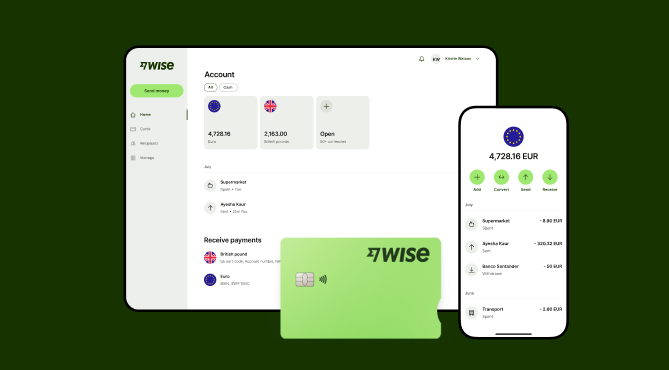
Wise Business serves as a cost-effective solution where you can receive money from around the world at the speed and price of local payments.
Transform the way you receive payments with Wise Business:
Sign up for the Wise Business account! 🚀
This general advice does not take into account your objectives, financial circumstances or needs and you should consider if it is appropriate for you.
1. Do I need a merchant account to accept online payments?
Most payment service providers (PSPs) combine payment gateway and processing, so you can accept online payments without opening a separate merchant account. Make sure to check your provider’s payment acceptance service, so you know exactly how it works before signing up.
2. How much does it cost to set up online payments in Australia?
The cost of setting up online payments will depend on the system (such as checkouts or invoices) and the methods you choose. You might have to pay transaction fees, plus monthly software or ecommerce fees. The total cost will include the tech for taking payments and processing them so they end up in your business bank account.
3. How long do online payments take to reach a business bank account?
Settlement times depend on the payment method, provider, and payout schedule. For example, PayID payments are typically sent in under a minute through Osko, while card payments can take longer⁷. Check your provider’s settlement terms for specific time frames.
Source:
*Please see terms of use and product availability for your region or visit Wise fees and pricing for the most up to date pricing and fee information.
This publication is provided for general information purposes and does not constitute legal, tax or other professional advice from Wise Payments Limited or its subsidiaries and its affiliates, and it is not intended as a substitute for obtaining advice from a financial advisor or any other professional.
We make no representations, warranties or guarantees, whether expressed or implied, that the content in the publication is accurate, complete or up to date.

Need a fast, frictionless, and cost-effective payment solution for your online store? We cover the best payment gateways for ecommerce.

Learn how to take payments on a website, from choosing a payment provider to setting up a checkout, accepting cards, and managing fees.

Discover how to build an end-to-end invoice automation workflow, avoid the pay-out gap, and scale your business with integrated payment solutions.

Need a payment processing solution for your business? We’re covering everything you need to know to start payment processing in Australia.

Learn how to accept online payments in Australia. Learn about methods like gateways, links, and bank transfers and managing fees, security, and compliance.
Compare the best Shopify payment methods for Australian businesses, and find the right solution to lower your transaction fees and boost sales.


